Gameplay
Attack Copter

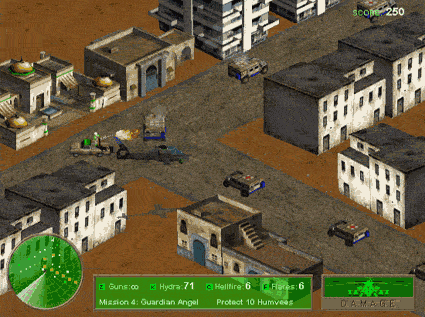
This is an action game featuring an Attack Helicopter. Pilot the helicopter and attack targets to complete the mission objectives. Move around, blow up the bad guys, and achieve the objectives to progress through the campaign. The green arrow on the Radar Upgrade will guide you to your main target. Keep an eye on your ammunition and health, and repair your helicopter if necessary.
Use the arrow keys to move and turn the Comanche helicopter. Keep moving and manoeuvring the helicopter whilst attacking a target to avoid becoming easy prey (a sitting duck) for the GLA’s anti-aircraft defences.
Mini-Guns (Z), Hydra rockets (X) and Hellfire missiles (C) are your primary weapons. The space bar will fire special weapons when they are available. The status of your weapons, ammunition, mission progress and your helicopter’s armour is shown in the green bar at the bottom of the game screen.
Select a mission to view the mission briefing, which outlines the primary objectives. Once the mission begins, follow the green arrow on the Radar Upgrade to locate the targets. The mission status and what you still need to do to complete it are shown in the green box. When you successfully complete a mission, you earn points and a jackpot spin. Once you’ve completed all three missions in a region, you’ll unlock the next region.
If you need help during a mission, press P to pause, bring up the mission map and replay the mission briefing. There are three difficulty levels, so you can ramp up the challenge and rewards as you progress.
Armoured Attack
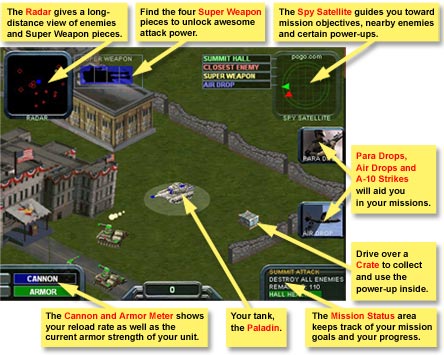
This is a tank combat game. Pilot the tank and attack targets with its armament to complete mission objectives. The green arrow on the Spy Satellite will guide you to your main objective.
Use the arrow keys to accelerate, turn round or steer your Paladin tank. Use the ‘move whilst attacking’ tactic to avoid becoming an easy target (a sitting duck).
The cannon (space bar) and the machine gun (A) are your primary weapons. If available, the A-10 air strike and the super weapon are controlled by the 1 and 2 keys. The indicators on the game screen show your armour status, the status of the super weapon, and the current mission. These indicators also show the positions of enemies, super weapon parts, mission objectives and airdrops.
Select a mission and watch the briefing, which outlines the initial objectives. Once the mission begins, follow the green arrow on the Radar Upgrade to locate the main mission objective. When you successfully complete a mission, you’ll earn a bonus and a jackpot spin. You’ll also gain access to the next mission.